User guide · CDSlides 0.1.7
Phones, Stream Deck and other controls
Clickers and the keyboard
USB clickers and foot pedals work straight away: they send the same keys as the keyboard. Their buttons can be changed, and they can work even when another program is in front. See Keyboard shortcuts.
Phones and tablets
A phone or tablet on the same network can run the slides, or follow along.
- On the CDSlides computer: Settings → This computer → Phones and tablets, turn it on.
- Two QR codes appear:
- To follow along: for musicians and anyone who just needs to see the words. Scan it with the phone's camera; no need to ask.
- To control: for running the service. Scan it, and CDSlides asks "Allow a phone to control?" on the computer: choose Allow it to control if you know whose it is.
- Or open the address shown and type the PIN instead.
On the phone:
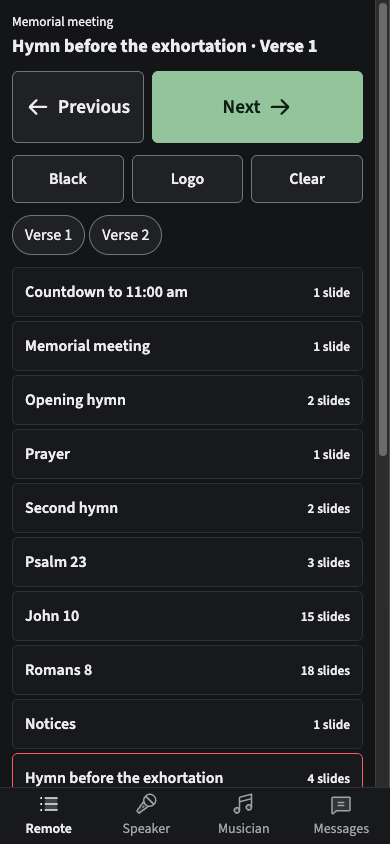
- Remote: Previous and Next, Black, Logo, Clear, the hymn's verses, and the service with every slide to choose from.
- Speaker: the current and next slide, notes and the timer, with big Previous and Next buttons.
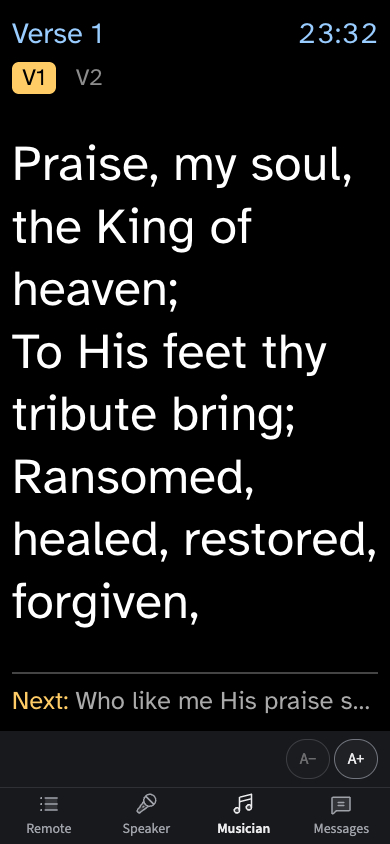
- Musician: the words with chords, following the service. A+ and A− change the text size on that device.
- Messages: send a message to the stage screens or the main screens.
Paired phones are listed in Settings with when they were last seen; Revoke removes one (or Revoke all).
Stream Deck
With Bitfocus Companion, a Stream Deck gets buttons for the slides, Black, Logo, verses, messages and more, with buttons that light up for Black, Logo and what's live. See Stream Deck and Companion.
Sound desks and show controllers (OSC)
Settings → This computer → OSC control lets a sound desk, lighting
console or show controller move the slides with OSC messages, such as
/cdslides/next or /cdslides/black 1. The settings show where to send
them and list every address. It's off unless you turn it on, and listens on
this computer only unless you allow other devices.
Next
Guides describe CDSlides 0.1.7. Source at f65a007e.