User guide · CDSlides 0.1.7
Songs and hymns
The song library
Library → Songs (bottom left) lists every song. Type in the search box to find one by its title, its words, or its number in a songbook (247 finds Hymn 247). Choose a song to open it; drag it into the service to add it.
+ makes a new song.
Editing a song
A song opens as plain text, one section after another:
# Verse 1
The Lord's my shepherd, I'll not want;
He makes me down to lie

# Chorus
Alleluia!
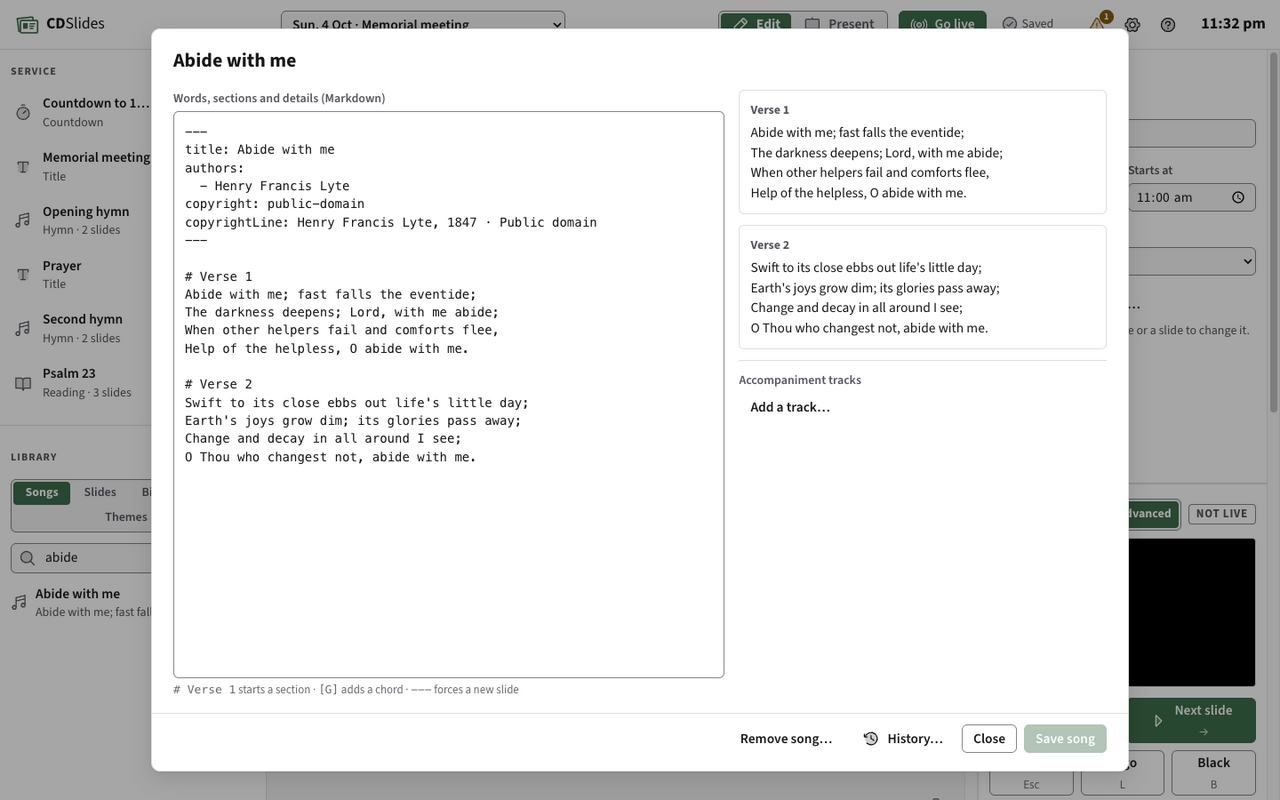
# Verse 1,# Chorus,# Bridgestart a section.---on its own line starts a new slide within a section.[G]before a word adds a chord (shown on musicians' screens, not the projector).- The title, authors, songbook numbers and copyright are at the top of the text.
Choose Save song. Every service using the song gets the change; what's on the projector changes only with Update live.
In a service, you can also edit a hymn's words in the middle of the screen, with the slides along the bottom.
Songbooks and numbers
Each song can have a number in one or more songbooks, such as Christadelphian Hymn Book 247. Title slides show it ("Hymn 247"), and searching for the number finds the song.
A song can be in several books under different numbers: a Riverwood Song Book song may also be Praise the Lord 35. Manage songs (the books button beside Import songs) lists every song with its books:
- Hymns show as Hymn 247, with their first line; other songs by title. Under Books, each book a song is in, with its number there.
- Search by words, or by book and number (rsb 15, hymn 247, wbo 12), or show one book in its own order.
- Add to a book gives a song a number in another book; the × on a number takes the song out of that book.
- New songbook… adds a book.
- Choose a book in the list beside the search box to show its songs and
its own controls (admins):
- Rename… changes its name and short name; its songs keep their numbers.
- Merge into… makes two copies of a book into one. Its songs move to the other book with their numbers; a song already in both keeps the other book's number, and CDSlides lists it.
- Remove… removes the book: its songs lose their numbers in it, but stay, with their other books. This can't be undone.
- Find duplicates… lists songs that look like copies of one song (the same number in a book with a similar title or first line, or the same title and words), such as when a songbook was imported twice. For each, choose the copy to keep: its words stay. The other copies' books, numbers and accompaniment are added to it, services that used them use it, and the copies go to Recently removed for 30 days. CDSlides suggests the copy a service uses, or whose words start properly, and marks a copy whose words start with a heading's Bible references or credits.
- Merge… does the same for two or more songs you've ticked.
- Remove from the library… removes songs added by mistake. Songs a service uses are kept; Recently removed brings them back for 30 days.
Importing songs
Choose Import songs in the library (the arrow beside the search box):
- A content pack (
.cdpack): a whole songbook, such as a hymn book, with its numbers and any accompaniment. When a newer version of the pack comes out, import it again: CDSlides shows what changed, and songs you've edited are kept as yours unless you choose otherwise. - Song files in a folder: OpenSong, OpenLyrics, ChordPro or plain text. Files named for their book and number (OrangeWorship 12.txt, Hymn 247) go into that book; songs already here, by title or by book and number, are marked In library and left unticked. The Worship books are WBP, WBO and WBB (Purple, Orange and Blue).
- A songbook as a PDF: a printed songbook's PDF with songs headed like 15. Great is the Lord. CDSlides reads each song's number, title, authors and copyright line, and the line naming it in other books (Praise the Lord 35). A song you already have, by title or by its number in another book, gets the new book's number added instead of a second copy (the review says Adds …). It also gets its numbers in the books it came from, so importing the PDF again tags songs you already have with their source books (Praise the Lord 35). If a source song is in your library as a separate song, the review says there are two copies. Choruses are found where words repeat; check the verses in the song editor.
- WorshipTools Presenter on this computer, an OpenLP library, or EasyWorship.
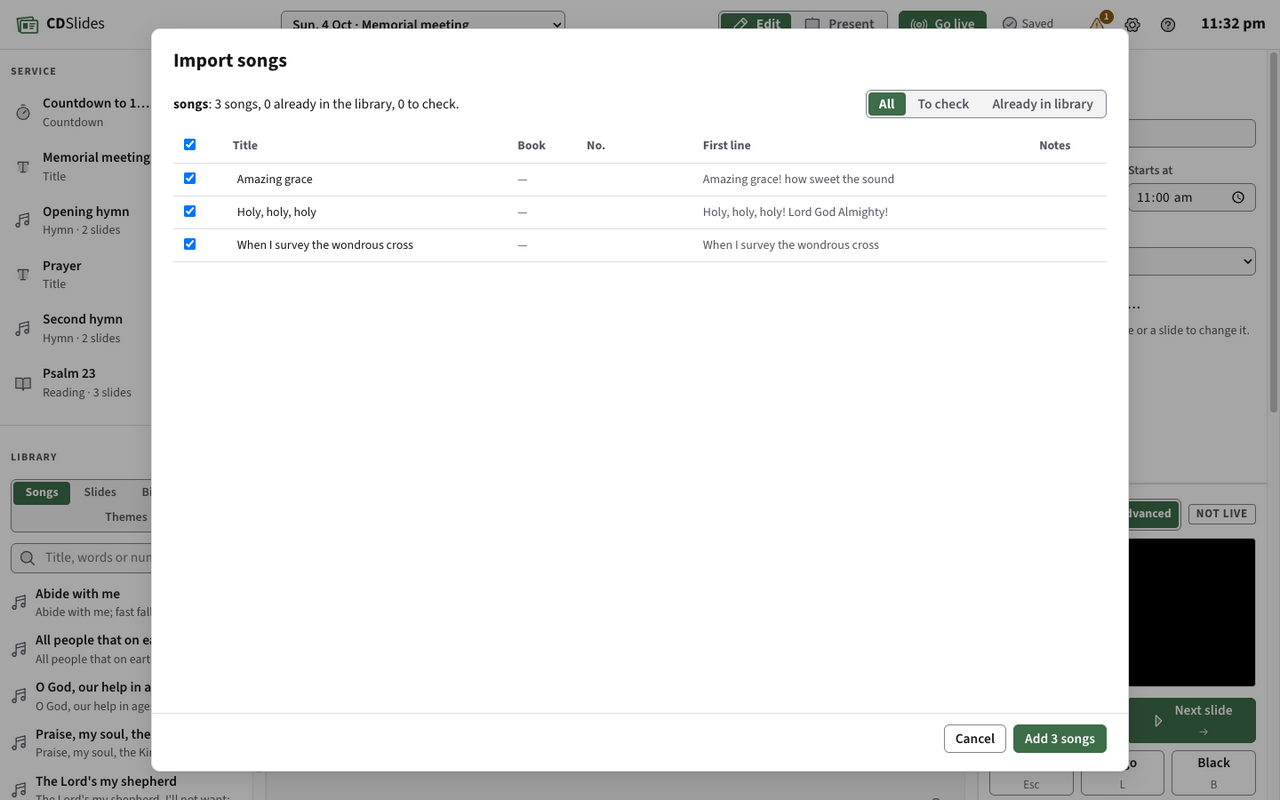
Each import shows the songs first, so you can see what will be added before you choose.
Export (beside Import) saves your songs as files, or a songbook as a content pack.
Title slides
A hymn can start with a title slide: its number, title, authors and copyright. Turn this on for every hymn in Settings → Hymns and CCLI, or for one service or one hymn in their settings.
Accompaniment tracks
A hymn can have a recording to sing along to (piano or organ):
- Open the hymn in a service and add a track in its settings (MP3, M4A, WAV and similar). Or drag a recording from Library → Media onto the hymn in the middle of the screen: it becomes that hymn's accompaniment.
- Choose whether it starts by itself when the hymn goes live.
The track plays beside the slides and stops when the service moves on.
Advancing with the track: CDSlides can change the slides in time with the music.
- In Present, choose Record timings on the hymn. The track starts from the beginning; press Next at each change.
- Or, in the hymn's settings, choose Estimate from the track for a first guess from the music's pauses and each slide's lines, then check it and record it to correct it.
Then tick Advance the slides with the track. Pressing Next yourself always takes over until the next change.
History and removing
- History… in the song editor shows earlier versions of the song, who changed it and when, and the differences from now. Restore this version brings one back; nothing is lost, so that can be undone the same way.
- Remove song… takes it out of the library. It's kept for 30 days in Settings → Library → Recently removed, where Restore brings it back.
Next
Guides describe CDSlides 0.1.7. Source at f65a007e.